18+ Disclosure: This guide is for adults aged 18 or over who create content legally. Some links may be affiliate links — we may earn a commission at no extra cost to you (see our affiliate disclosure). Earnings vary widely; nothing here is a guarantee of income or growth.
Last checked: October 22, 2026. How Fansly's own discovery tools work, how to bring in traffic from other platforms safely, and how to measure what's working.
One reason creators choose Fansly is that it has its own discovery features. Fans can find you through tags, suggestions and a For You page, not just through links you share elsewhere. But those tools only help if you set them up properly, and most creators still need traffic from other platforms.
This guide explains how to promote a Fansly page using the features Fansly describes in its own Help Center, checked on October 22, 2026. We name each Help Center article so you can look it up. We haven't run a Fansly account ourselves, so this isn't a "what worked for me" story. Anything we couldn't confirm on an official Fansly page is labelled commonly reported. Features change, so please check the official site before you rely on any step.
For fees, payouts and whether Fansly suits you at all, read our Fansly review first.
Fansly Promotion Tools At A Glance
| Tool | What it does | Source |
|---|---|---|
| Profile tags | Private labels that help the algorithm match you with fans | Help Center: Profile Discoverability Features |
| Hashtags | Public tags in captions for search and trending pages | Help Center: Profile Discoverability Features |
| For You page (FYP) | Recommends opted-in posts to fans | Help Center: For You Page (FYP) |
| Free previews | Needed for locked media to appear on the FYP | Help Center: For You Page (FYP) |
| Connections | Linking Twitch or X may get you recommended to people who follow you there | Help Center: Profile Discoverability Features |
| Tracking links | Show which sources bring follows, subscriptions and revenue | Help Center: Tracking Links on Fansly |
| Promotions and discounts | Limited-time prices, multi-month plans, discount links | Help Center: How Do I Offer a Discount on My Subscriptions? |
| Reposting and tagging | Share and credit other creators | Help Center: reposting and tagging articles |
As checked on October 22, 2026. Features may change, so check the official site.
Part 1: Fansly's Built-In Discovery Tools
Profile Tags
According to Fansly's "Profile Discoverability Features" article, profile tags are "private labels you assign to your profile to help the algorithm understand what kind of content you create." Fansly says it uses them to match you with users who enjoy similar content and to place you in users' Suggestions tabs.
How to use them well: pick tags that accurately describe what you post. Accurate tags put you in front of fans who actually want your niche. Misleading tags get clicks from people who won't subscribe.
Hashtags
The same article explains that hashtags "are public and appear in your post captions." They help posts appear in hashtag searches and on relevant pages. Fansly's own tip is to "combine niche and trending hashtags to maximize your reach." The Wikipedia article on hashtags gives useful background on how they work across platforms.
Fansly's recommendations article notes that "posts, hashtags, and emojis must comply with Fansly's Terms of Service." Stick to relevant, rule-compliant tags.
The For You Page (FYP)
Fansly calls the FYP its "built-in discovery system." According to its "For You Page (FYP)" article, getting a post onto it involves a few steps:
- Add a free preview to locked media. "Without a preview, your post won't appear on FYP."
- Select "Post to FYP" when creating the post. If something's missing, a pop-up tells you what to fix.
- Check your timeline settings. If your timeline is locked to followers or subscribers, Fansly says to turn on the "Internal discovery when the timeline is hidden" toggle in Account Settings. Alternatively, you can add #fyp to individual posts.
Fansly also notes that only posts you opt in are included, and that content marked private won't appear on the FYP.
Posting only to the FYP: Fansly explains that you can post to the FYP without showing the post on your profile. To do this, make your Posts wall private, choose a different main wall, then deselect all walls (or pick a private one) when you post. This is useful if you want a tidy profile but still want reach.
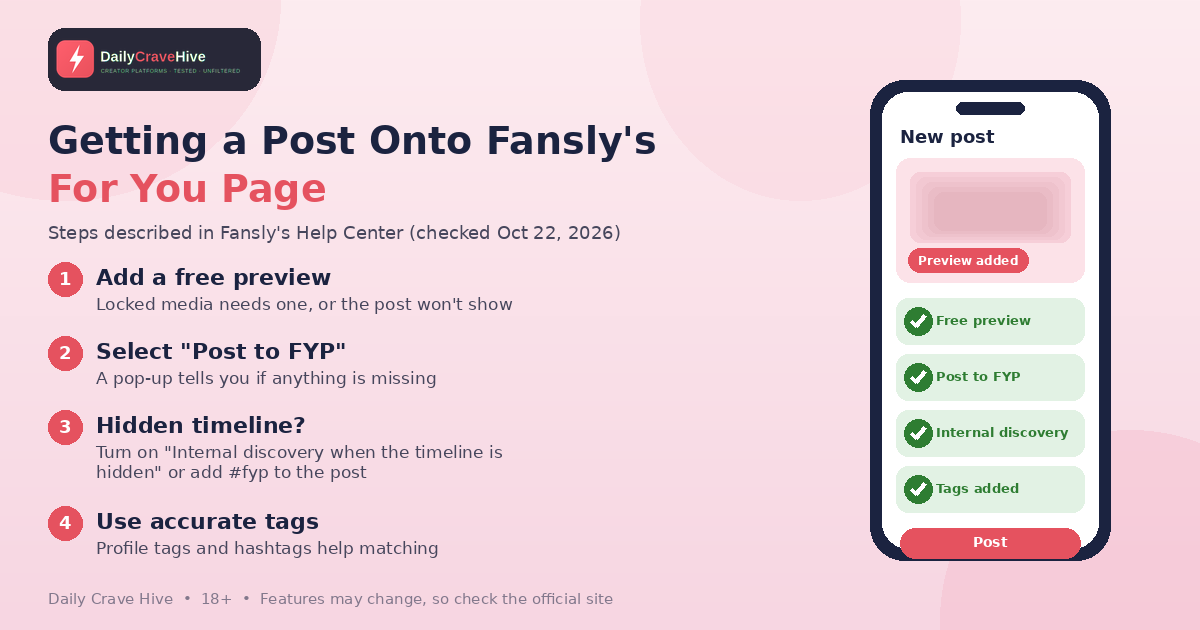
Fansly says locked posts need a free preview to appear on its For You page.
Free Previews
Fansly's "Adding a Free Preview to Your Media" article explains that you choose part of your media to show as a teaser. The built-in editor lets you "blur, censor, or add text." Fansly suggests keeping previews short and experimenting with different ones. Because previews are required for the FYP, they're one of the most useful promotion tools you have.
Connections
According to "Profile Discoverability Features," you can connect Twitch and X (formerly Twitter) accounts under Connections in Settings. Fansly says that if someone who follows you on Twitch or X connects their account or signs in with one of those, your profile may be recommended to them. Fansly also says it "will never post on your connected platforms or edit your information without your permission."
Collaboration: Tagging And Reposting
Fansly's "Tagging System" article explains that typing @ plus a creator's name links to their profile. Its reposting article draws an important line:
- Reposting shares another creator's post with credit and needs no consent form.
- Reuploading someone else's content to your account requires signed consent forms. Failing to get consent "may lead to enforcement action against your account."
Fansly's advice is: "When in doubt, repost instead of reupload." Collaborating with creators in a similar niche is commonly reported to be one of the better ways to reach new fans.
Part 2: Pricing Tools That Help Promotion
Fansly's "How Do I Offer a Discount on My Subscriptions?" article lists several options:
- Promotional discounts: a limited-time price that doesn't change your base price. Fansly says "your followers will be notified when a new promotion starts."
- Multi-month discounts: 2-, 3- or 6-month plans, with discounts of up to 50% off.
- Subscription discount links: special rates, or free access, for selected people.
According to the "Free Trials or Lifetime Subscriptions" article, free trials are available, but free lifetime subscriptions aren't. Use these tools sparingly. Constant discounts are commonly reported to train fans to wait for a sale.
Part 3: Off-Platform Promotion
Fansly itself encourages promoting elsewhere. Its "Advertising on Social Media" article advises learning "best practices for each platform" and including "a direct link to your Fansly profile in your posts or bio." It also warns: "Before linking to any external sites, review the Terms of Service (TOS) for each platform to ensure your content complies with their guidelines."
That warning matters. Mainstream platforms have their own rules on adult content and links, and breaking them can cost you an account.
Tips For Off-Platform Promotion
- Use one consistent name. Fansly's "Creating an Identity or Brand" article recommends using "the same username on all your accounts" so fans can find you.
- Use a stage name if you want privacy. The same article suggests one "if you prefer to protect your personal identity."
- Keep teasers within each platform's rules. Read the rules before you post. They're often stricter than Fansly's.
- Add links to your Fansly bio. According to "Promoting Other Websites," you can add links to X, Instagram, Linktree and more, "as long as they follow our Terms of Service."
- Post consistently rather than in bursts. This is commonly reported advice, not a Fansly rule.
- Engage with fans. Fansly's branding article recommends you "respond to comments and messages."
A Note On Reddit
Reddit is one of the off-platform channels creators mention most often, but every community sets its own rules on self-promotion, verification and links. Our guide to selling feet pics on Reddit walks through Reddit's platform-wide rules and how community rules usually work. Most of that advice, such as using a separate account, labelling mature posts and never spamming, applies to promoting a Fansly page too.
If you're comparing where to put your promotion effort, our Fansly vs OnlyFans comparison covers how discovery differs between the two.
Part 4: Measure What Works With Tracking Links
Fansly's "Tracking Links on Fansly" article explains that tracking links "show you which sources drive the most engagement and revenue." You can create a separate link for each platform, for example one for your Instagram bio.
Fansly also gives you three built-in internal tracking links: FYP, Suggestions and Search. These show how many fans find you inside Fansly itself.
According to the article, the metrics include:
- Claims: clicks that lead to a login or sign-up. Clicks from visitors who don't log in or sign up aren't counted.
- Follows: follows after clicking the link
- Subscriptions: new subscriptions from the link
- Revenue: total revenue from people who used the link
Fansly notes that tracking links are different from referrals. They measure performance rather than earning referral income directly.
Practical tip: check your links regularly. Put more effort into the sources that bring subscriptions, not just clicks.
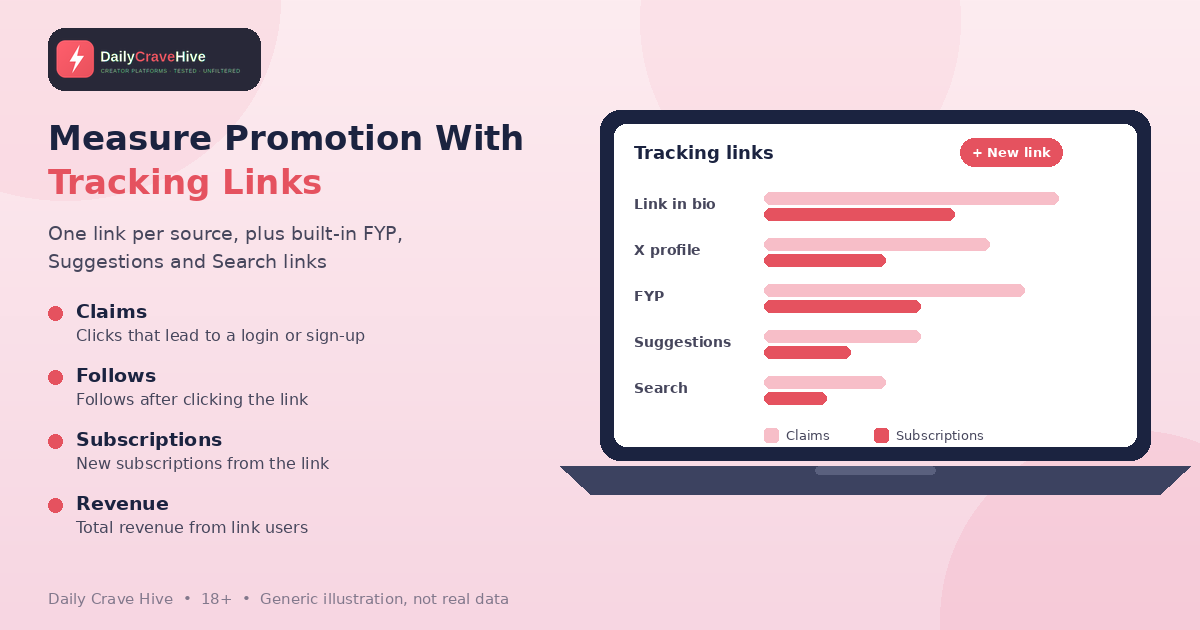
Tracking links show which sources actually bring paying fans. Illustration only, not real data.
A Simple Weekly Promotion Routine
There's no official Fansly schedule, so treat this as a starting framework rather than a rule. It simply puts the tools above in order:
- Review your tracking links. Note which sources brought follows and subscriptions, not just claims.
- Check your profile tags. Make sure they still describe what you actually post.
- Prepare posts with free previews and opt the right ones into the FYP.
- Share teasers off-platform within each platform's rules, using the same username everywhere.
- Reply to comments and messages, as Fansly's branding article recommends.
- Plan any promotion in advance instead of discounting every week.
Promotion Mistakes And Safety
- Paying for "guaranteed growth." Fansly's FYP article says its support team "is unable to help boost engagement or provide individualized advice." Be wary of anyone selling guaranteed placement or followers.
- Agency and login scams. Never share your Fansly login. Our OnlyFans scams guide covers agency and impersonation tricks that apply to Fansly creators too.
- Phishing. The FTC's guide to recognizing and avoiding phishing scams advises contacting a company using a website you know is real, not links in unexpected messages.
- Reuploading without consent. Repost instead.
- Ignoring other platforms' rules. A banned promotion account means lost traffic.
Frequently Asked Questions
How do I get on the Fansly For You page?
According to Fansly's Help Center, add a free preview to any locked media, select "Post to FYP" when posting, and turn on "Internal discovery when the timeline is hidden" if your timeline is restricted. Only posts you opt in appear there.
What are Fansly profile tags?
Fansly describes profile tags as private labels that help its algorithm understand your content. It uses them to match you with fans and place you in their Suggestions.
Can I promote my Fansly on social media?
Yes. Fansly's Help Center encourages it and recommends adding your Fansly link to your bio. It also advises checking each platform's Terms of Service first, because rules on adult content and links vary.
How do Fansly tracking links work?
You create a tracking link for each traffic source. Fansly then shows the claims, follows, subscriptions and revenue linked to it, plus built-in links for its FYP, Suggestions and Search.
Does Fansly offer free trials?
According to Fansly's Help Center, creators can offer free trials, but free lifetime subscriptions aren't available. Promotional discounts and multi-month plans are also available.
Can Fansly support help me grow my account?
No. Fansly's FYP article says its support team can't help boost engagement or give individual growth advice. It suggests learning from the creator community.
Final Thoughts
Promoting Fansly works best in two layers. Set up the built-in tools properly, including accurate tags, free previews and FYP opt-ins. Then bring in steady traffic from other platforms while following their rules. Use tracking links to see what's actually working, avoid anyone promising guaranteed growth, and check the official site for the latest features.
Last checked: October 22, 2026. This guide is for adults aged 18 and over.
Alma MartinEditor, Daily Crave Hive
Alma Martin is the editor at Daily Crave Hive. She reviews creator and adult platforms - fees, payouts, safety and more - so readers get honest guides before they sign up.